Edelweiss Installation
System requirements
Edelweiss runs on 32 or 64-bit Windows 10 or higher.
License
Edelweiss is free to try for 30 days.
To continue using Edelweiss after the trial period, reach out to rhd instruments to purchase a license.
Installation and product registration
Follow these steps to install Edelweiss:
- Download the latest version of the installer.
- Run the installer and follow the instructions in the wizard.
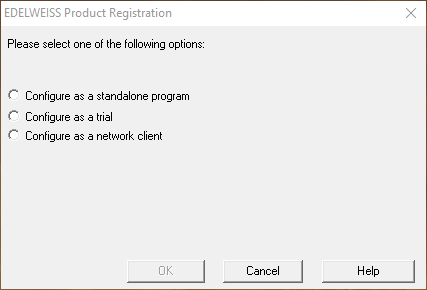
- On the first run, you will be prompted to register the product:
- Unless you have purchased a license, select "Configure as a trial" to try out Edelweiss for 30 days.
- If you have purchased an individual license, select "Configure as a standalone program" and input your license key.
- If your institution has a network license, select "Configure as a network client". If the license server is running on the same network, it should be automatically detected.
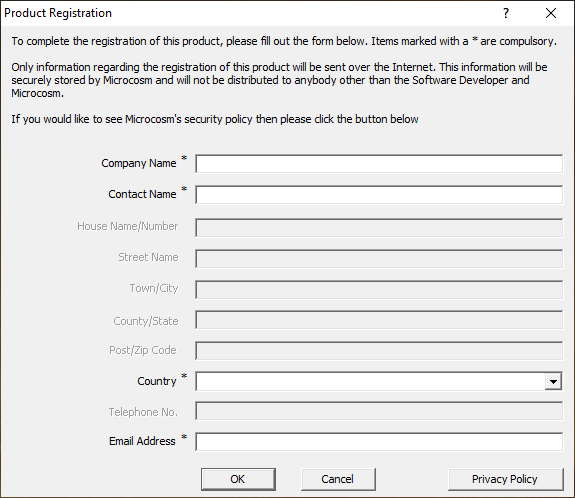
- Fill in your information in the form:
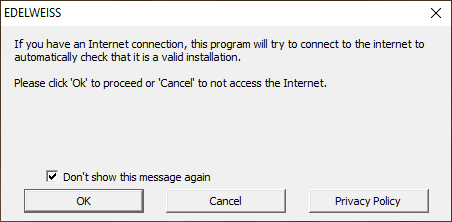
- The software is now ready to use. You can disable future license popup messages by ticking the checkbox:
Getting started
After installation, check out these resources to get started with Edelweiss:
They are accessible from the "Help" menu, as well as from the welcome page shown when Edelweiss starts up.